
Carmit Perez makes handmade concrete pieces in her studio in Haifa: Judaica, home decor, gifts and workshops. Her store has 387 products and ran on WordPress, WooCommerce and Elementor. On 18 October 2026 we split it. This post explains what that means, what changed in the numbers, and what we learned along the way.
What this post is about, in one sentence: a real case study of splitting an existing WooCommerce store, with measurements before and after. It is for online store owners whose store is slow on mobile and who do not want to give up WooCommerce.
What exactly we did
A store split, known in the trade as Headless WooCommerce, divides the store in two:
- Behind the scenes, nothing changed. WordPress and WooCommerce keep managing products, stock, orders, the cart, checkout and payments. Carmit adds a product exactly as before.
- The side the customer sees was rebuilt. The home page, the categories and all 387 product pages were built in Astro and are served as ready-made pages from the Cloudflare network.
When a visitor clicks “add to cart” they move to WordPress, at shop.carmitart.com, and pay there. The cart and checkout were restyled so it all looks like one site.
Why does this work? On a normal WordPress site every page visit wakes the server: it fetches data, runs plugins and builds the page again. In a store this is especially heavy, because caching plugins switch off exactly on the pages where the customer decides whether to buy. On the split site the page is already built and waiting, close to the visitor.
Drag and see for yourself
Same home page, same tool: Google’s PageSpeed test, on mobile. One side: the store on WordPress, on 18 October at midday. The other: the same store after the split, that same night. Drag the handle.
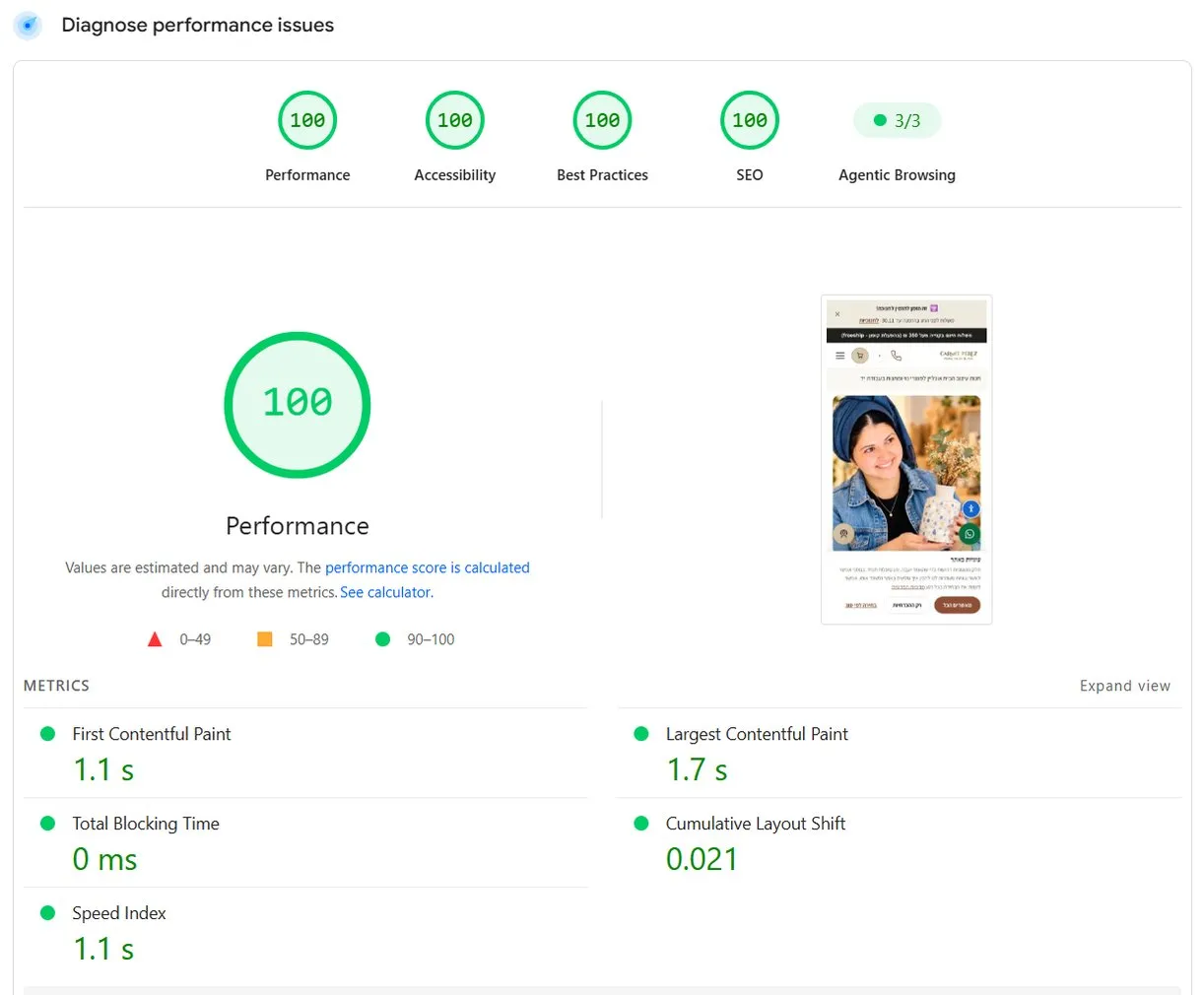
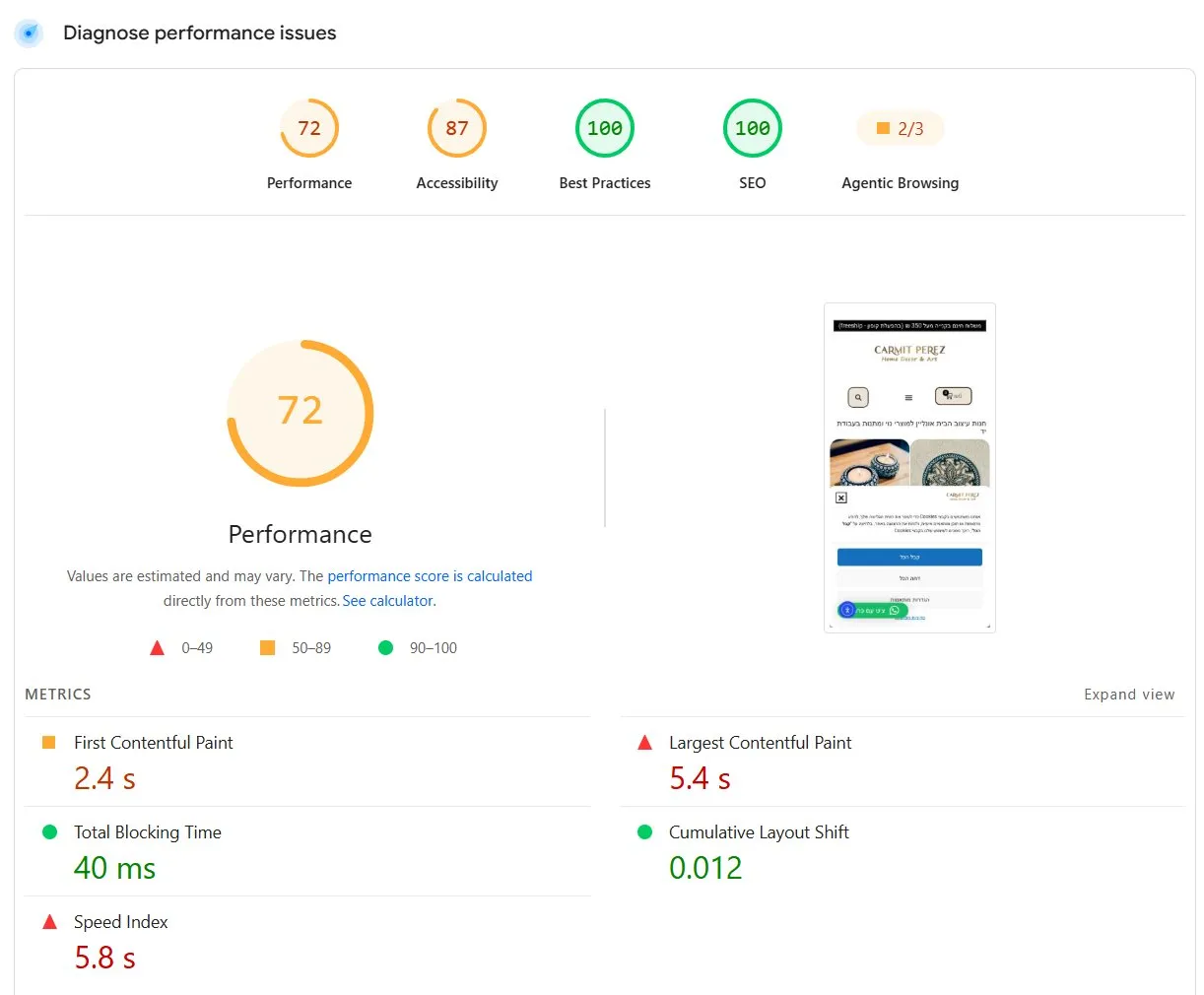 לפניאחרי
| Home page, mobile | WordPress | After the split |
|---|---|---|
| Performance | 72 | 100 |
| Accessibility | 87 | 100 |
| Agentic Browsing (how well AI agents can read the site) | 2 of 3 | 3 of 3 |
| First contentful paint | 2.4 s | 1.1 s |
| Largest contentful paint (LCP) | 5.4 s | 1.7 s |
| Speed Index | 5.8 s | 1.1 s |
| Total blocking time | 40 ms | 0 |
One test is not a measurement
A PageSpeed score moves from run to run, sometimes by ten points on the same page in the same minute. So besides the test in the screenshot we ran our own measurement tool: three runs per device, before and after, taking the median.
| Home page, median of 3 runs | WordPress (18.10) | After the split (19.10) |
|---|---|---|
| Performance, mobile | 66 | 98 |
| Largest contentful paint, mobile | 7.1 s | 1.8 s |
| Performance, desktop | 90 | 100 |
| Largest contentful paint, desktop | 1.7 s | 0.5 s |
| Page weight | 2.4 MB | 1.2 MB |
| Requests | 151 | 33 |
The number I find most interesting here is not the score but the request count. The old home page asked for 151 separate files to load, dozens of them external plugin scripts. The new one asks for 33. Each request is one more wait on the customer’s phone, usually on a mobile connection.
Why not just optimise the WordPress site?
We tried. About two months before the split we gave the store an optimisation round: every image was converted to WebP, saving more than 110 MB. In a single test after that round the mobile score went from 76 to 98.
Two months later the same home page measured 72 in a single test and 66 as a median. We did not investigate exactly what pulled it back. A live WordPress site changes all the time: plugins update, banners get added, Elementor adds code. An optimised WordPress site is not a fixed state, it is maintenance. In a split architecture speed comes from the structure itself, not from a plugin the next update can break.
Three home page designs, and one that felt like Carmit
When the customer-facing side is built in code rather than from a theme, the design is not tied to anything. We used that to build Carmit three completely different home pages, on the same store and the same engine.

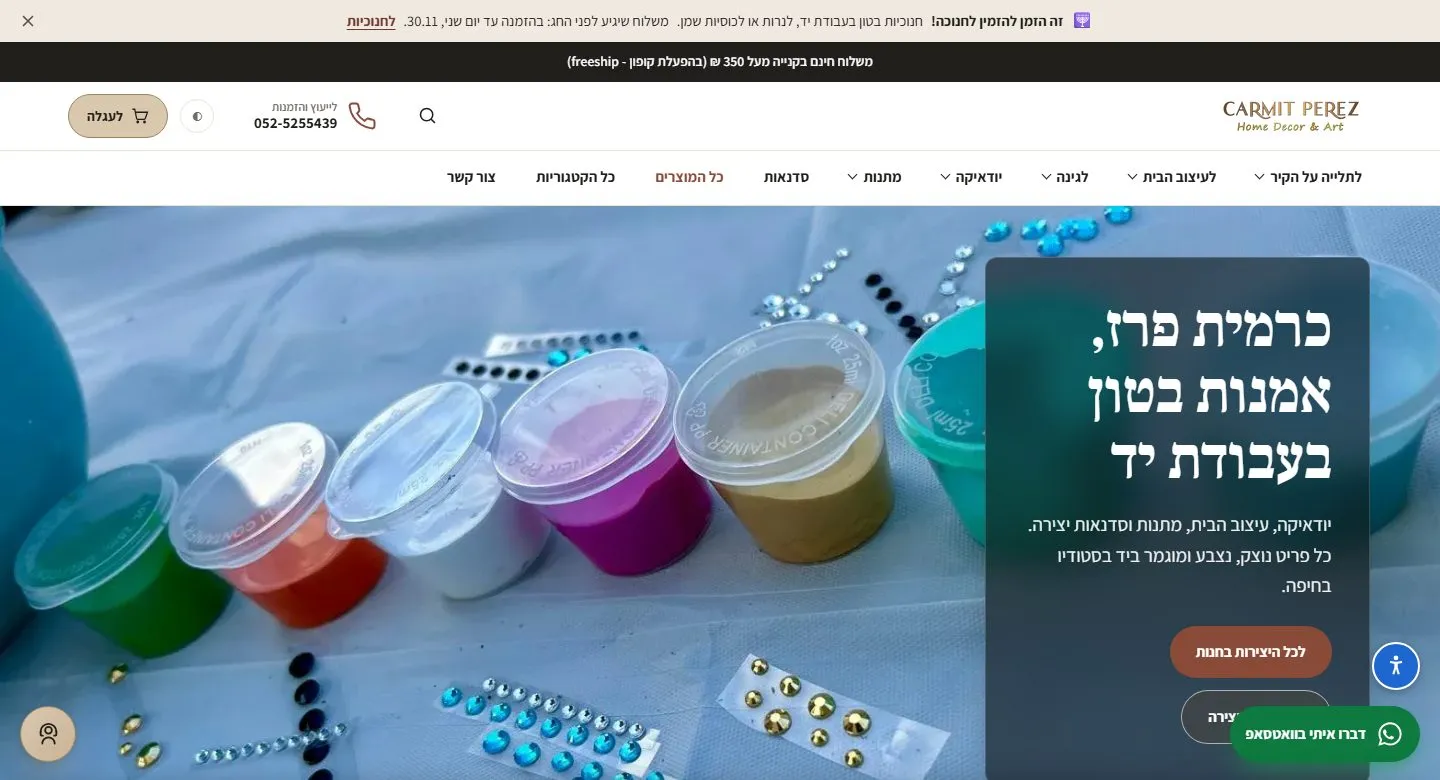

Carmit chose version C, and it is the right choice for her store. Someone buying a handmade mezuzah case is also buying the person who made it. The other two versions stayed as demo pages, and all three load equally fast. That is the point: in a split store you do not choose between design and speed.
What we learned on cutover day
Three things worth knowing before you split a store, because none of them announces itself:
- Cloudflare Pages reads only part of the redirects file. We prepared a redirect for every old address. Minutes after the switch, 440 of the 495 addresses Google knew returned “page not found”, with no warning in the build or the deploy. We measured it: only about the first 130 rules in the file were read. We moved the redirects into code, and now all 495 addresses work.
- A permanent redirect is stored in the visitor’s browser. For about an hour and a half in the middle of the move, the main domain redirected to WordPress. Anyone who visited in that window kept landing on the old site even after the fix, because their browser remembered the redirect. The lesson: never let the main domain return a permanent redirect, even for a few minutes. Move it directly from the old site to the new one.
- Only a real request to the real site tells the truth. All our checks against the build files passed. The problems showed up only when we requested the real addresses from the live domain. Since then such a check is a fixed part of every move.
What has not changed yet, and why
PageSpeed also has a top section: “Discover what your real users are experiencing”. Google collects this data from real Chrome users and computes it over the last 28 days. The day after the move it still describes almost only the old site: largest contentful paint 2.2 seconds, and a first server response of 1.9 seconds, which Google marks in red.
The server response time is exactly what the split should fix, because pages are now served ready-made from a nearby server instead of WordPress building them on every visit. A lab test does not show this well, because it visits the site under comfortable conditions; only real visitors will tell. That is our expectation, not yet a result. We will update this post once the 28-day window fills with data from the new site.
Who this is for, and who it is not for
A split pays off for a store with traffic, many products, and an owner who does not want to give up WooCommerce. That is exactly Carmit’s situation, and also that of Picli, the store we built this way from the start.
It pays off less for a small store with few sales, where the same budget would do more in marketing. We wrote a whole post about it: when not to split a WooCommerce store.
In summary
Carmit’s store did not lose a single product, address or order. The admin stayed exactly as it was. The mobile home page went from 72 to 100 in a single test, and from 66 to 98 as a median of three runs, and the request count fell from 151 to 33. Along the way she got a home page in a design she picked out of three.
Have a WooCommerce store that loads slowly on mobile? Send us the address, and we will tell you honestly whether a split is worth it, including when it is not.