

In August 2026 we ran Cloudflare’s new check on our own site, the one whose name asks “is your site agent-ready?”, at isitagentready.com. We typed primestack.co.il into the new tool and came out with 20 out of 100. Our site is fast, accessible, scores 100 on PageSpeed and carries every SEO signal you would expect. And yet, by this new measure, an AI agent arriving at it finds a site that barely talks to it.
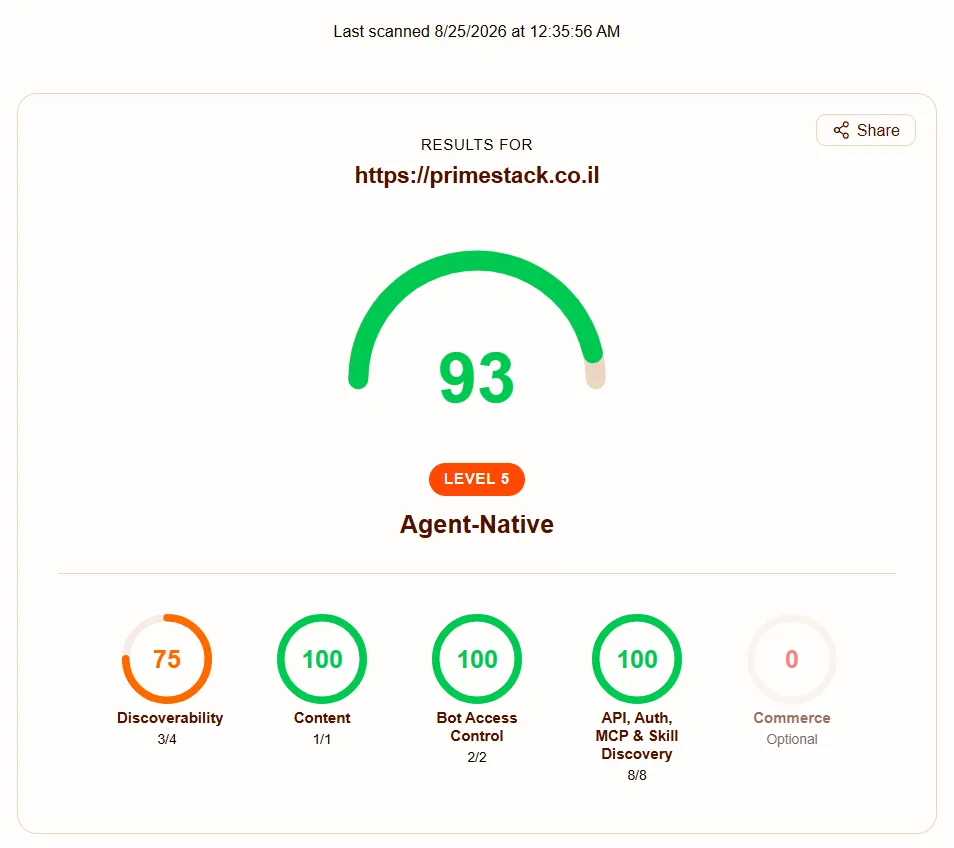
We sat down to learn the subject, and later that evening we reached 93. The 100 will probably arrive within hours: it depends on a change we made at the DNS server, which takes time to propagate. This post explains what is actually measured there, why it started to matter now of all times, and what an ordinary business owner should do about it. In plain language, with every new term explained where it appears.
What you will learn from this post
- The difference between “AI reads the site” and “an AI agent uses the site”, and why that difference changes the whole test
- Exactly what Cloudflare’s new score checks, in five categories, and what each term means
- What levels 0 to 5 mean, and which level makes sense for a small business site
- What we did on our own site in a day, and what we deliberately chose not to do
- What it does not do, so you do not buy false promises
Who this post is for: business owners who already understand that customers arrive through ChatGPT and Gemini and want to know the next step, and people who build or maintain websites and want the map before it becomes a requirement. If you have not read our explainer on GEO yet, start there.
First, the definition: what is an “AI agent”
Until recently, the way AI touched your site was simple: it read it. ChatGPT or Gemini crawled the page, understood what it said, and quoted it in an answer if needed. We wrote about that in how ChatGPT reads your website.
An AI agent is the next step. It does not just read, it acts on the user’s behalf. The user says: “find me a beautician in Ra’anana with a slot on Thursday afternoon and book it”, and the agent goes off to check sites, compare, and try to book. Or: “check what a brochure site costs at three agencies and make me a table”.
To do that, the agent needs three things from your site:
- To know what it is allowed to do - does the owner permit it to read, quote, use the content
- To read the content easily - without fighting menus, scripts and banners
- To know which actions exist - is there a form? an API? can it book? where?
Agent Readiness is exactly the measure of those three things.
Why now
Cloudflare, the company a large share of global internet traffic passes through, published a post in April 2026 called “Agent Readiness” and with it a free tool: isitagentready.com. Type an address, get a report.
Their claim is simple: “The web has always had to adapt to new standards. It learned to speak to web browsers, and then it learned to speak to search engines. Now, it needs to speak to AI agents.”
Alongside the tool they published a survey of the 200,000 largest domains in the world. The numbers are interesting because they show how empty this field is:
| What was checked | Sites that pass |
|---|---|
| A robots.txt file exists | 78% |
| AI preferences declared (Content Signals) | 4% |
| A clean markdown version for agents | 3.9% |
| An MCP server card or API catalog | fewer than 15 sites in the whole survey |
⚠️ These numbers come from Cloudflare’s survey of large sites worldwide. We have no data for Israeli sites. My estimate, and it is an estimate, not a figure: in Israel the picture is similar or worse.
What that means for a business owner: whoever does the basics now is in a very small group. Not because it is hard, but because almost nobody has noticed yet.
What exactly is measured: five categories
The tool runs 22 checks, of which 15 count toward the score. They are grouped into five categories. Here is each one, with the terms explained.
1. Discoverability: can the agent find what the site has
- robots.txt - a small text file at the site’s root that tells robots what they may crawl. It has existed since the nineties, and most sites know it from SEO.
- sitemap.xml - a list of every page on the site. Also familiar from SEO.
- Link headers - “headers” the server sends along with the page, saying “I also have a catalog here, and a description there”. The agent does not have to search; it gets the addresses up front.
- DNS-AID - a DNS record (like the one that says where your mail server is) announcing “this site has an entry point for agents”. A very young standard; almost nobody implements it.
2. Content Accessibility: can the agent read easily
- Markdown for agents - the interesting one. A web page is a large HTML file: menus, scripts, styling, footer, cookie banner. The agent needs only the text. A new standard says: if the agent asks “give me this page as markdown” (a plain text format), the server returns a clean version. On our site the homepage is 158 kilobytes as HTML and 12 kilobytes as markdown. For the agent that is less time and less cost; for you it is a higher chance it reads to the end.
3. Bot Access Control: what may be done with the content
- AI bot rules in robots.txt - explicit lines for OpenAI’s GPTBot, Anthropic’s ClaudeBot, Google-Extended and more. Not just “everyone allowed”, but by name.
- Content Signals - three words in robots.txt stating what is allowed:
search(may index and link),ai-input(may feed the content to a model while it answers, i.e. quote it),ai-train(may train models on it). The declaration is a preference and a reservation of rights, not a technical block. - Web Bot Auth - a way for a bot to identify itself with a digital signature. Informational only, not scored.
4. Capabilities: what the agent can operate
This is where the scariest-sounding terms live. All of them are files in a special folder on the site called .well-known:
- API Catalog - a list of the programming interfaces the site exposes. Ours, for example, is the speed test.
- Agent Skills - an “operating manual” file for the agent: how to read this site, where the prices are, what must not be promised.
- MCP Server Card - the business card of an MCP server. MCP is the protocol AI agents use to operate tools. The third post in this series covers it.
- A2A Agent Card - a business card for Google’s agent-to-agent protocol.
- OAuth discovery - where to request permission for protected data (relevant to sites with user accounts).
- auth.md - a text file explaining to the agent, in words, “do you need to log in, and how”.
- WebMCP - a few lines on the page telling an agent’s browser “here are actions you can take here”.
- ARD - a general catalog of all capabilities. An early draft.
5. Commerce: can an agent buy
Five standards for automated purchasing (x402, UCP, ACP and others). Not scored, and relevant only to a shop that wants an agent to complete a purchase for a customer. A world of its own; we will not go into it here.
The levels: 0 to 5
Besides the score out of 100, the tool returns a level, and in my view that is the better way to look at it, because it says what the site can actually do:
| Level | Name | Requirement |
|---|---|---|
| 0 | Not Ready | fewer than two of robots.txt, sitemap, Link headers |
| 1 | Basic Web Presence | two of the three. Most sites are here. |
| 2 | Bot-Aware | Level 1 + AI rules in robots.txt + Content Signals |
| 3 | Agent-Readable | Level 2 + a markdown version |
| 4 | Agent-Integrated | Level 3 + one of: MCP card, A2A card, Agent Skills, API catalog |
| 5 | Agent-Native | Level 4 + two of: Web Bot Auth, all integrations, auth metadata |
The important line: Level 4 is reached with files alone. A brochure site, a blog, a law firm’s site, all of them can honestly reach Level 4 without building any server. Level 5 and a score of 100 need live services, and that is a project.
What we did on our site, in one day
Our story is short because it was short. We ran the check: Level 1, 3 checks out of 15, score 20. We passed robots.txt, sitemap, and bot rules (only because “everyone allowed” counts). Everything else failed.
In the morning we did the things that need files only:
- Added a Content Signals line to robots.txt and explicit lines for 13 AI bots
- Wrote a script that, on every build of the site, generates a clean markdown version of each of the 140 pages
- Added the
.well-knownfolder with an API catalog, agent instructions and a capability catalog - Taught the server to answer a markdown request, and to send Link headers from the homepage
- And made sure the site’s Shabbat gate does not block those files, because a check that runs into a “site closed” page is recorded as a failure
On the next scan: Level 4, 9 out of 15, score 60. Every check we built passed on the first try.
In the evening we added the three cheap checks that were left: an auth.md file (which says: “no login needed, everything is open”), a small WebMCP script that registers three actions (site search, reading a page as markdown, opening the speed test), and one DNS record. 80.
A regular visitor saw no change at all. Not one pixel moved.
And the rest
Three checks stand between 80 and 100, and all of them need a live server, not a file: a real MCP server an agent can connect to, an A2A card pointing at such a server, and OAuth-based agent registration. We built all three the same night, and the site now stands at Level 5 (Agent-Native), 14 of 15. The last check depends on a DNSSEC signature at the domain registrar.
But that is no longer “files in a day”. It is a server, with code, a signing key and decisions about what an agent may do. All of that, and the question of who it is really worth it for, is taken apart in the third post in the series.
What it does not do
I want to say this explicitly, because I can already see how it will be sold:
- It is not a Google ranking factor. Nobody has said this score affects search position.
- It does not guarantee agents will come. It removes obstacles for the ones that already do.
- It is no substitute for good content. An agent that reads an empty site easily still finds an empty site. The 30 content types that win in AI search matter more than any file here.
- Most of these standards are young. Some are drafts that may change. The basics (robots, Content Signals, markdown) are relatively stable; the edge (DNS-AID, ARD) is still moving.
So what to do, in practice
If you have a brochure site or a blog: ask your maintainer for the basics. A Content Signals line and AI bot lines in robots.txt are fifteen minutes of work. A markdown version of the pages is a day on a site built in code, and depends on a plugin on WordPress. Level 2 to 3 is within reach.
If you have a shop or a booking system: the stakes are higher here, because an agent that can buy or book on a customer’s behalf is a new sales channel. Worth a conversation.
Either way: run the check at isitagentready.com. It is free, takes seconds, and attaches a fix explanation to every failure. We plan to add it to our digital health report as well.
Short glossary
- AI agent - software that receives a task and carries it out in several steps, including browsing websites.
- GEO - Generative Engine Optimization, adapting a site for answer engines. Full explainer.
- robots.txt - a permissions file for robots at the site root.
- Content Signals - three declarations in robots.txt: search, quote, train.
- Markdown - a plain text format with simple markers for headings and lists. What agents like to read.
- .well-known - a standard folder on a site for files that machines look for.
- MCP - Model Context Protocol, the protocol agents use to operate tools. Third post in the series.
- Level - 0 to 5, what the site actually lets an agent do.
In summary
Agent Readiness is not another buzzword, and not another “score” to chase. It is a simple checklist for one question: when an AI agent reaches your site, does it understand what is here, what it is allowed to do, and how to read it without drowning?
Most sites today, ours included until two weeks ago, answer “no” to most of it. The basics are a few text files and one day of work, and they put you in a group of a few percent of sites worldwide. The edge, servers an agent can operate, is a business decision rather than a technical one.
In the next post in the series we open the files themselves, line by line: what goes in robots.txt, what exactly Content Signals are and what you should declare, and what a markdown version of a page looks like.