
Before we start - this is not a redesign story. It is not “we made it prettier” or “we added new features.” This is a story about a real WordPress site that we moved to Astro pixel for pixel - same design, same content, same page structure, zero visual changes - to see what happens to performance once you strip away the WordPress layer and leave only what the browser actually needs.
The site: eyalmeshulam.com. Not an anonymous client - our own personal site.
The Starting Point: A Good Site on Good Hosting
Let’s be fair here: this was not a neglected WordPress site on cheap hosting. It ran on uPress - a managed WordPress hosting service that specializes specifically in speed, with servers tuned for WordPress - sitting behind Cloudflare as a proxy, exactly the setup recommended when you want to push WordPress performance as far as it goes. In other words, this was a stack that already did almost everything right on the hosting side.
And yet, when we ran PageSpeed Insights on mobile, we got:
- Performance: 66
- Accessibility: 94
- Best Practices: 100
- SEO: 92
- First Contentful Paint: 3.3 seconds
- Largest Contentful Paint: 6.4 seconds
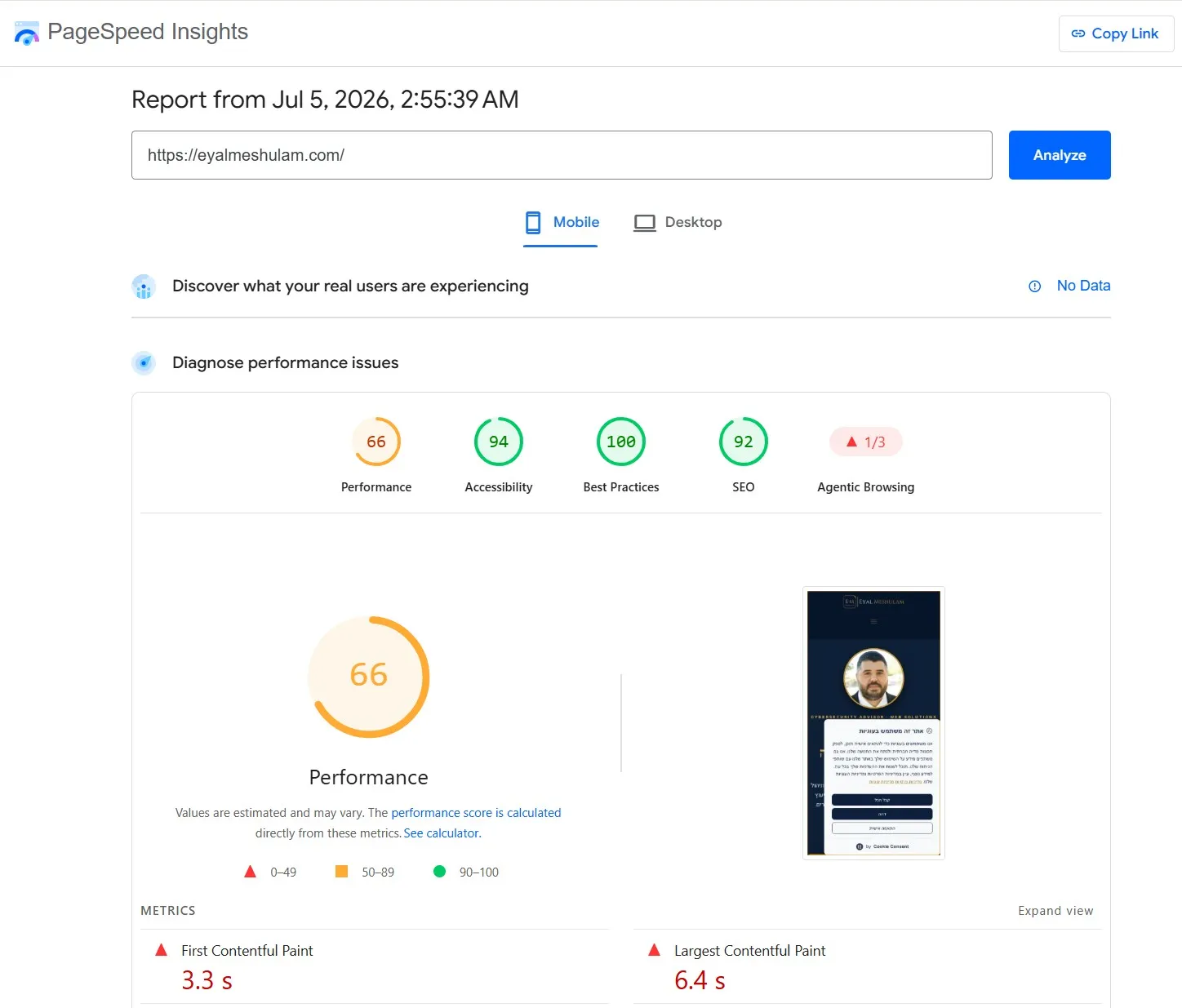
6.4 seconds until the main content loads is a long time in a world where users abandon a page after 3. Desktop looked better (93) - but that’s exactly the trap: desktop numbers hide the truth, because most real traffic comes from mobile devices with weaker networks and hardware, which is exactly where WordPress “breaks.”
Why This Happens Even With Excellent Hosting
The root of the problem was never a slow server. It was the architecture itself. Every WordPress page, even a “simple” one, drags along:
- A templating engine that re-runs on every request and builds HTML dynamically
- Dozens of requests to plugins, each shipping its own CSS/JS
- Database queries that run even when nothing has changed since yesterday
- Caching layers that try to “patch over” the problem instead of solving it at the root
Fast hosting and a good CDN reduce the damage - but they can’t change the fact that the browser still has to download, parse, and execute a huge amount of JavaScript and CSS before it can paint anything on screen. That’s exactly why uPress + Cloudflare got to “only” 66 instead of 40 - they did everything possible around WordPress. What happens inside WordPress can’t be fixed without changing the platform.
After the Move to Astro
We rebuilt the exact same site - word for word, pixel for pixel - in Astro, with pure static HTML output instead of a server rebuilding every request from scratch. No design changes, no content changes, no visual “improvements.”
The mobile result:
- Performance: 100
- Accessibility: 100
- Best Practices: 100
- SEO: 100
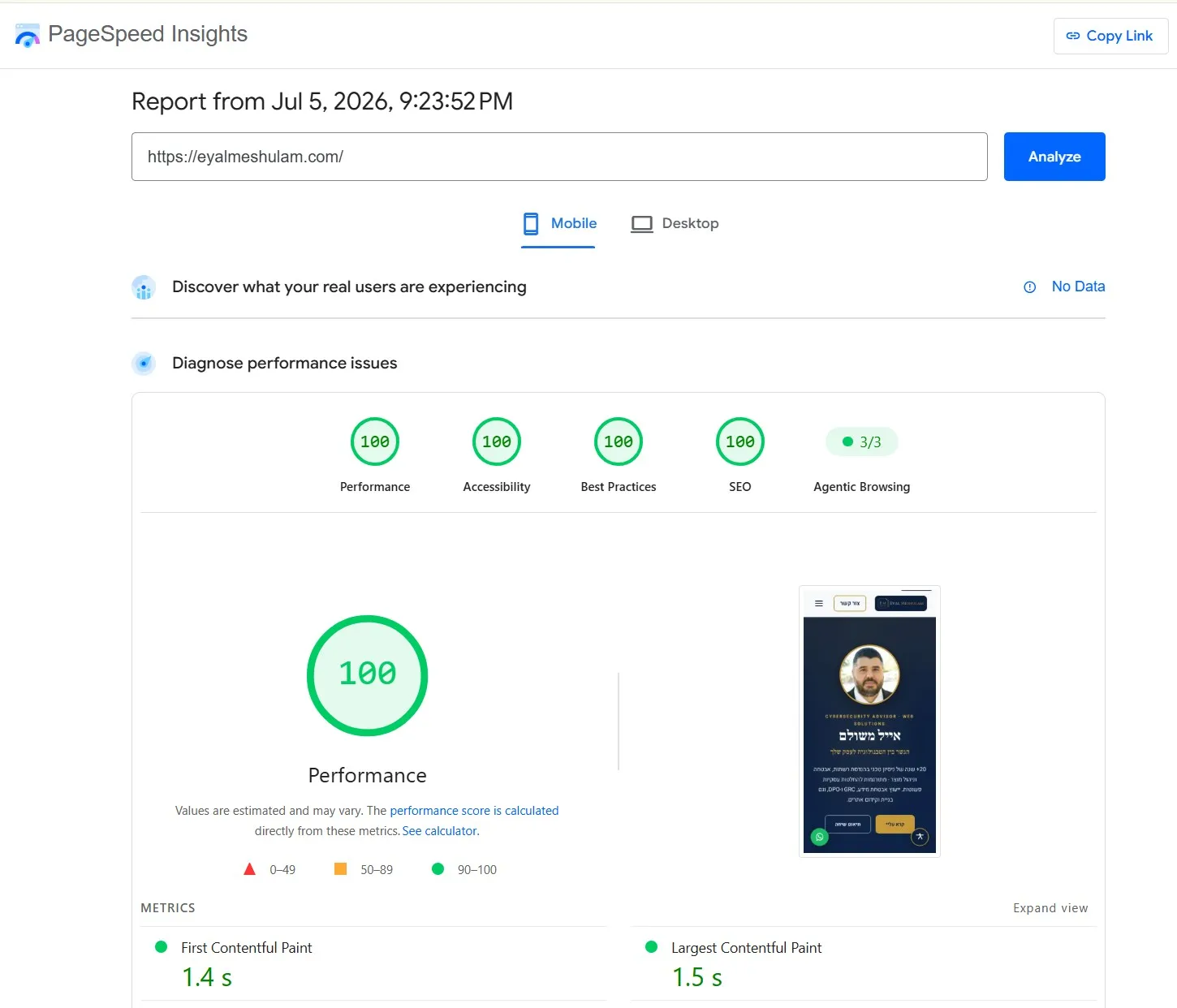
And on desktop - the same picture, 99 performance and 100 on everything else:
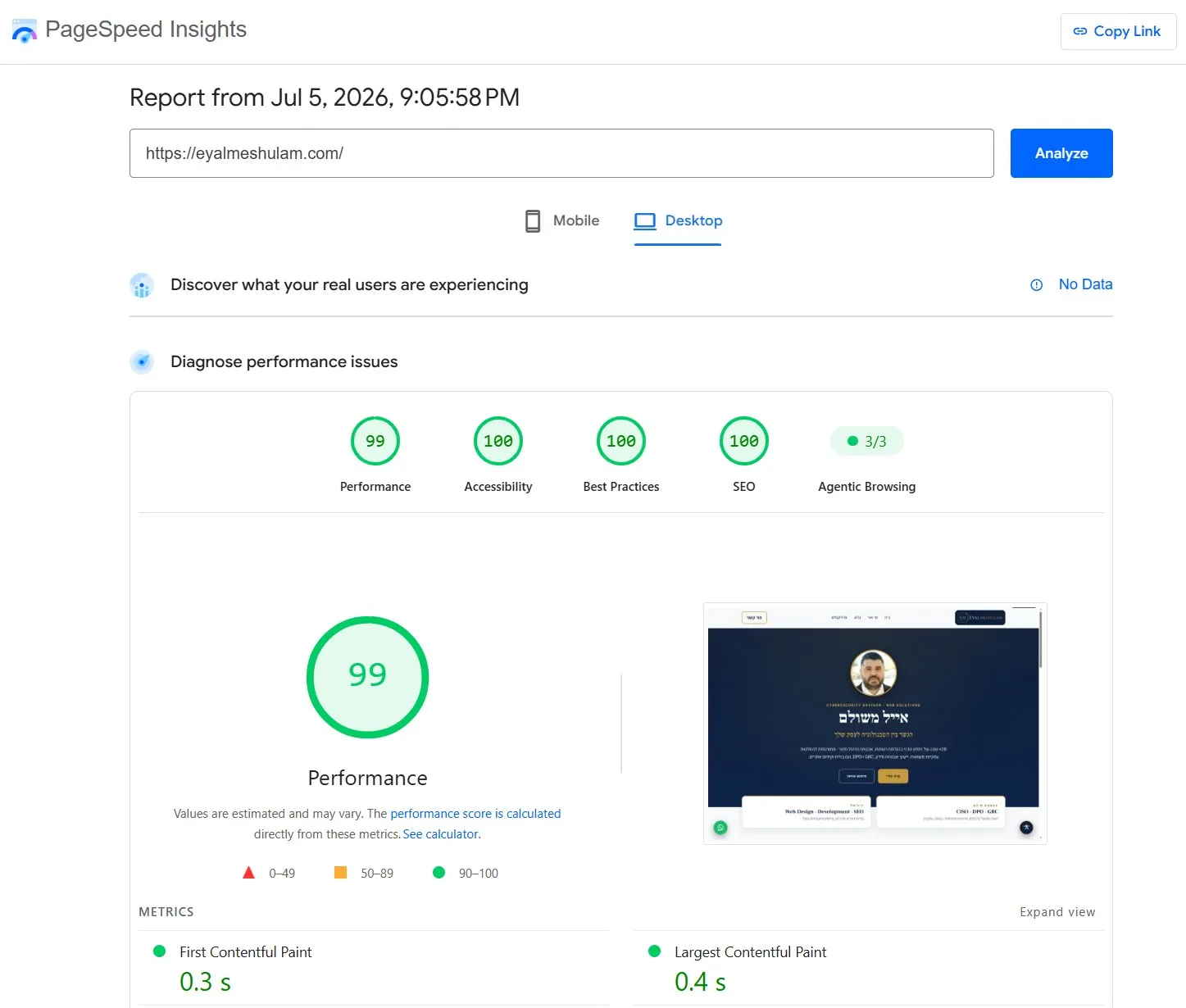
Notice: this is not “a small improvement.” This is the difference between a pedal boat and a rocket ship. Same destination, same passenger, same cargo - completely different way of getting there. First Contentful Paint dropped to under a second, and Largest Contentful Paint - which had been 6.4 seconds - dropped to about a second and a half.
What This Actually Means
This is not just “a nice number on a screen.” Core Web Vitals are officially part of Google’s ranking algorithm - a faster site outranks slower competitors even when the content is completely identical, exactly like in this case. Beyond that, load speed directly affects bounce and conversion rates - every second of delay costs a brand potential customers.
There’s another angle most site owners don’t think about: AI engines like ChatGPT and Perplexity, when they “read” websites to answer user questions, prefer content that’s accessible and fast to crawl. A static site that loads instantly is also a site that’s easier for an AI engine to “digest” - and that’s becoming more relevant by the day.
The Bottom Line
This isn’t a lab experiment on a demo site. It’s a real, live website, running on some of the best WordPress hosting available, that moved to Astro without changing a single pixel - and jumped from 66 to 100 in mobile performance. If your site runs on WordPress, even on fast hosting, there’s a good chance it suffers from the exact same structural problem.
Questions & Answers
Does moving to Astro require redesigning the site? Not necessarily. As shown here, you can migrate an existing site 1:1, without touching the design or content, and get the performance win on its own. A redesign is a separate option, not a requirement.
How long does a migration like this take? It depends on the site’s size and how much dynamic content it has (forms, databases, integrations). A simple brand site with a handful of pages can move in a few days; a site with dozens of pages and changing content needs more careful planning.
Will we lose our existing Google ranking? Not if it’s done right. Keeping the same URLs (or clean 301 redirects), the same heading structure, and the same content is exactly what preserves existing SEO - and in practice, a faster load time usually improves ranking rather than hurting it.
Without WordPress, how do we edit content afterward? It depends on your needs - there are solutions that allow comfortable content editing even on a static site (a headless CMS, simple editable content files, or a custom admin interface). This is a question worth answering before the migration, not after.
Is this right for every WordPress site? Not for everyone. Complex WooCommerce stores, portals with heavy real-time dynamic content, or sites the client updates themselves daily through a visual editor - sometimes WordPress is still the right call. But for brand sites, portfolios, landing pages, and blogs - which is the vast majority of business websites out there - Astro is almost always the right upgrade.