
In the two previous posts in the series (what Agent Readiness is and the files that teach AI to read the site) we talked about a site an AI agent reads. This post is about the next stage, where an agent operates the site: books an appointment, requests a quote, checks stock, orders. Here the site stops being a leaflet and starts being a tool.
It is also the part where Cloudflare’s score goes from 80 to 100. We built it on our own site the same night, and will say exactly what that included and what it did not.
What you will learn from this post
- What MCP is, why it is called “the USB-C of AI”, and what a “server card” is
- The difference between MCP, WebMCP and A2A, in one table
- What an agent can actually do on the site of a beautician, a law firm, a shop
- What OAuth is, what we actually built of it, and the difference between “authorization” and “identity” for an agent
- What we plan to build, and what it can give our clients
Who this post is for: business owners with something that can be ordered (a slot, a product, a service) who want to know whether “customers through AI agents” is a real channel or a slogan, and people who maintain websites and want the map before a client asks.
The first term: MCP
MCP stands for Model Context Protocol. Anthropic (the company behind Claude) published it as an open standard in November 2024, and within a year OpenAI, Google, Microsoft and most tools in the field adopted it. Today it is the accepted way an AI agent talks to an external service.
The problem it solves: before MCP, every service that wanted AI to be able to use it had to invent its own way. A connection to Google Calendar one way, to a CRM another, to the inventory system a third. Like a drawer of charging cables, each for a different device.
MCP says: there is one socket. The service publishes “here are my tools” in a uniform format: the tool’s name, what it does, which details it needs. The agent reads the list and knows how to call every tool without anyone writing special code for it. Hence the image that appears everywhere: the USB-C of AI.
A concrete example. Say a clinic has an MCP server with two tools:
check_availability- takes a date and a treatment type, returns free slotsbook_appointment- takes a slot, a name and a phone number, books it
A customer tells her agent: “book me a facial on Thursday afternoon”. The agent discovers the server, calls the first tool, gets a list of slots, picks one (or asks her), calls the second. The clinic has a booking. Nobody spoke on the phone and nobody filled in a form.
The MCP server card
How does the agent discover that such a server exists? Through a server card (MCP Server Card): a small JSON file at /.well-known/mcp/server-card.json. It says: “there is an MCP server here, this is its address, these are the tools, this is how to authenticate”. A business card.
And here is the point that makes this a completely different stage from the previous post: the card is worthless without a live server behind it. The card points at a server address, and on our site that address really answers: an agent that calls it gets a list of tools and can run them. A card pointing at an empty address is a promise that breaks on the first call, which is why this is the part that needs real work rather than a text file.
The second term: WebMCP
WebMCP is a younger and different sibling. Instead of a server outside the page, it is code inside the page. A few lines of JavaScript that run when the page loads and tell the browser: “here are actions you can take here”. The standard is pushed by Google and Microsoft within the W3C, and is available in Chrome as a developer preview.
When it matters: when an AI agent browses the site through a browser, like a person. Such agents exist today (ChatGPT’s agent mode, for instance, or Claude in the browser). When such an agent reaches a page, instead of “seeing” the buttons and guessing what they do, it gets an orderly list of actions.
We registered three: search across the whole site, read any page as markdown, and open the speed test. A regular visitor notices nothing, because their browser simply ignores the code. A single if checks whether the capability exists, and if not, nothing happens.
The difference in cost is enormous: WebMCP is an hour of work. An MCP server is a project.
The third term: A2A
A2A (Agent-to-Agent) is a protocol Google published in April 2025 and handed to the Linux Foundation. The idea: an agent talks to an agent, not to a website. The customer’s agent approaches the business’s agent, presents a task, and the two negotiate.
Its expression on a site: an agent card at /.well-known/agent-card.json, presenting the business as an agent: what it can do, how to reach it, how to authenticate. Like the MCP card, it too needs a live server behind it.
In practice, today, MCP and A2A overlap a lot. The same server can present two “faces”: tools in MCP, and capabilities in A2A. Whoever builds one can add the other at small cost.
| MCP | WebMCP | A2A | |
|---|---|---|---|
| Who pushed it | Anthropic | Google + Microsoft (W3C) | |
| Where it lives | a server, outside the page | inside the page, in the browser | a server, outside the page |
| Who calls it | an agent connecting from outside | an agent browsing in a browser | another agent |
| Business card | mcp/server-card.json | none, the code itself | agent-card.json |
| Cost to build | days | an hour | days (or an add-on to MCP) |
| When it is worth it | there is a real action to offer | always, cheap | when MCP already exists |
The fourth term: OAuth, and what we built of it
OAuth is the standard behind “sign in with Google” on a third-party site. In the world of agents, it says: “to access protected data (the customer’s orders, their account), the agent must ask for permission, and this is where to ask”. Two files in .well-known announce it, and both count toward the score.
When it is right: a shop with customer accounts, a system with a personal area, anything where the agent acts on behalf of an identified user. There it is mandatory, and there it is also part of the security.
And what do you do when nothing on the site requires a login, as on ours? At first we meant to skip it: building an authorization server with nothing to protect sounded like a lock on a door with no room behind it. Then we realised there is an honest, small version of it that is not “authorization” but identity:
- Anonymous registration (RFC 7591): an agent sends one request and receives an id and a secret. No human approval, no email, no account, no access to anyone’s data.
- Exchange for a token: with the id and secret the agent gets a signed token valid for 15 minutes. The public key for verifying the signature is published at a known address (
jwks.json), so anyone can check the token is really ours. - Use: the agent attaches the token to MCP calls. On our site that is optional, not required, because the tools are public and read-only anyway. The token is a polite calling card, not a gate.
What this gives us in practice: if tomorrow we want a tool that does need an identity (say, “check the status of a quote”), the plumbing exists. What it is not: it is not a user system, there are no humans in it, and no one’s passwords. Our rule for clients stands: full OAuth, with humans logging in, is built only when there are real accounts to protect. The anonymous version can go on any site, because it opens no door that was not already open.
What an agent can actually do, by type of business
This is much easier to understand through examples than definitions. The rule: any action the customer does today through a form or a phone call, that does not require human judgement, is a candidate for a tool.
A beautician in Ra’anana: check availability, book a slot, get a reminder. Judgement (matching a treatment to skin) stays with her, but the agent can pass on the question with the details.
A law firm: not booking a meeting without screening, but yes: collecting the enquiry details in a structured way (field, urgency, city), giving information on practice areas, sending the enquiry to the office with everything it needs. The agent saves the first phone call, which is all detail-gathering.
A product shop: search the catalog, check stock, get a price with shipping, and at an advanced stage complete a purchase (this is where the commerce standards for agents come in, a separate category in the scanner that is not scored).
A web agency (us): run a speed test on an address, search the blog, get the price list, and perhaps in future get an initial quote by site type.
What stays with a person in every case: anything that requires approval, judgement, or where a mistake is expensive. The agent collects and passes on. The person decides. We wrote about exactly the same principle for leads from the site, and nothing about it has changed: the technology shortens the path to a person, it does not replace them.
What we plan
Let us be transparent, since this is the series where we promised not to sell buzzwords.
What is already live on our site: all three steps. An MCP server at primestack.co.il/mcp with three tools (site search, any page as markdown, the service list and where its prices live), an MCP card and an A2A card pointing at it, anonymous registration and tokens as described above, and an auth.md file explaining all of it to an agent. Level 5 in the scanner (Agent-Native), 14 of 15 checks. The last check, DNS-AID, requires a DNSSEC signature on the domain, which is done at the domain registrar.
What we are looking at: instead of building a server from scratch for every client, one piece of code that installs the same three tools on every site we maintain. The tool that really interests us is the third one, a structured enquiry: an agent that arrives with a name, phone, field and urgency instead of a first phone call. Search and read-a-page are extras, not the reason. And for whoever has more to offer, bookings or a catalog, dedicated tools go on the same skeleton. The saving is in maintenance, not in servers: on Cloudflare a server per site costs the same as one server.
What we will not build: cards with no server behind them, and tools that act on a customer’s behalf without a person approving.
And what starts first: an Agent Readiness check joins our digital health report, alongside speed, SEO and AI visibility. Because before building a server for someone, they should see where they stand today. Most likely: Level 1, as we were.
What it is not (a last reminder)
- A score of 100 in the scanner does not mean customers will arrive through agents. It means that when they do, the door is open.
- An MCP server does not replace a good site, good content or orderly questions and answers. It is built on top of them.
- All the standards here are young. MCP is relatively stable; WebMCP and A2A are still changing. Whoever builds today should be ready to update.
Glossary
- MCP - Model Context Protocol. A uniform standard for an agent to operate a service’s tools.
- Server Card - a JSON file in
.well-knownannouncing an MCP server. - WebMCP - actions defined inside a page, for an agent browsing in a browser.
- A2A - Agent-to-Agent. Google’s protocol for agents talking to each other.
- Agent Card - a JSON file presenting a business as an A2A agent.
- OAuth - the authorization standard: how an agent asks for access to protected data.
- Tool - one action an agent can call: a name, a description, and what it needs to be given.
In summary
This series started at 20 out of 100 and a number we did not understand. It ends with a simple understanding: an AI agent needs three things from a site. To know what it is allowed, to read easily, and to know what it can operate. The first two, any site can provide in a day of work. The third is worth providing only when there is really something to operate, and then it is not a “score” but a sales channel.
If you have a business with something that can be ordered, and you want to know what an agent could do with it and what that would take, that is exactly the conversation we enjoy. And if you have a brochure site, do the files, run the check, and join the group of a few percent. That is enough for now.
Epilogue: we reached 100
We wrote this whole series while the last check was still pending: the DNSSEC record that closes the DNS-AID check needed to publish at the domain registrar, and that can take anywhere from a few hours to a full day. It published, and running the check again now returns a score of 100 out of 100, Level 5 of 5, Agent-Native.
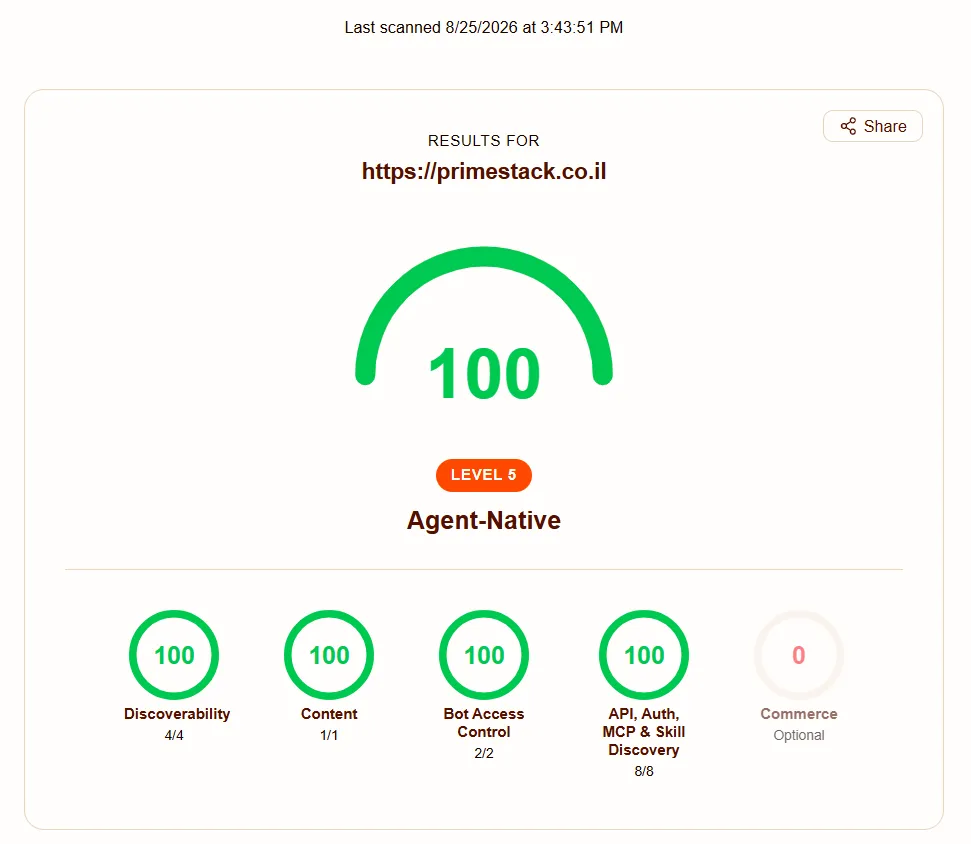
That did not change a single line of code. It is exactly the point that ran through all three posts: 93 out of 100 was already an honest, complete answer to every question an AI agent asks a site. The 100 came from one DNS record waiting on a registrar, not from more work.
If you have read this far and want to know where your own site stands today, not only on Agent Readiness but on speed, SEO and AI visibility, that is exactly what our digital health report gives you: a real picture, for 99 ILS. You can get one on the health report page.