
ChipLab is our computer repair lab in Haifa. It has the same owners as A.M.S, which provides IT services to businesses, but it has its own name, brand and website, because its audience is different: private people and small businesses whose computer simply stopped working. We bought the domain on October 12, 2026, and a week later, on October 19, the site went live.
What this post is about: this is a portfolio post. It shows what a site we built from scratch for a technical service business looks like, what is in it, and the decisions behind it. It is not a case study with before and after measurements, because there was no previous site.
What you will find here
- The problem the site was built to solve
- A “from” price list, and why every price comes with two explanatory sentences
- 21 do-it-yourself guides, and an AI rep that reads them
- The design: dark mode by default, with a switch to light
- The numbers, and what your business can take from all this
Who this post is for: owners of technical service businesses (labs, technicians, installers, maintenance people) who wonder whether to publish prices, whether to write guides, and what a site that brings in enquiries should look like.
The problem the site solves
When a computer breaks, two worries come up for almost everyone: how much will it cost, and what will happen to my files. Most repair lab websites answer neither. They ask you to call, and that is where the feeling that something is being hidden begins.
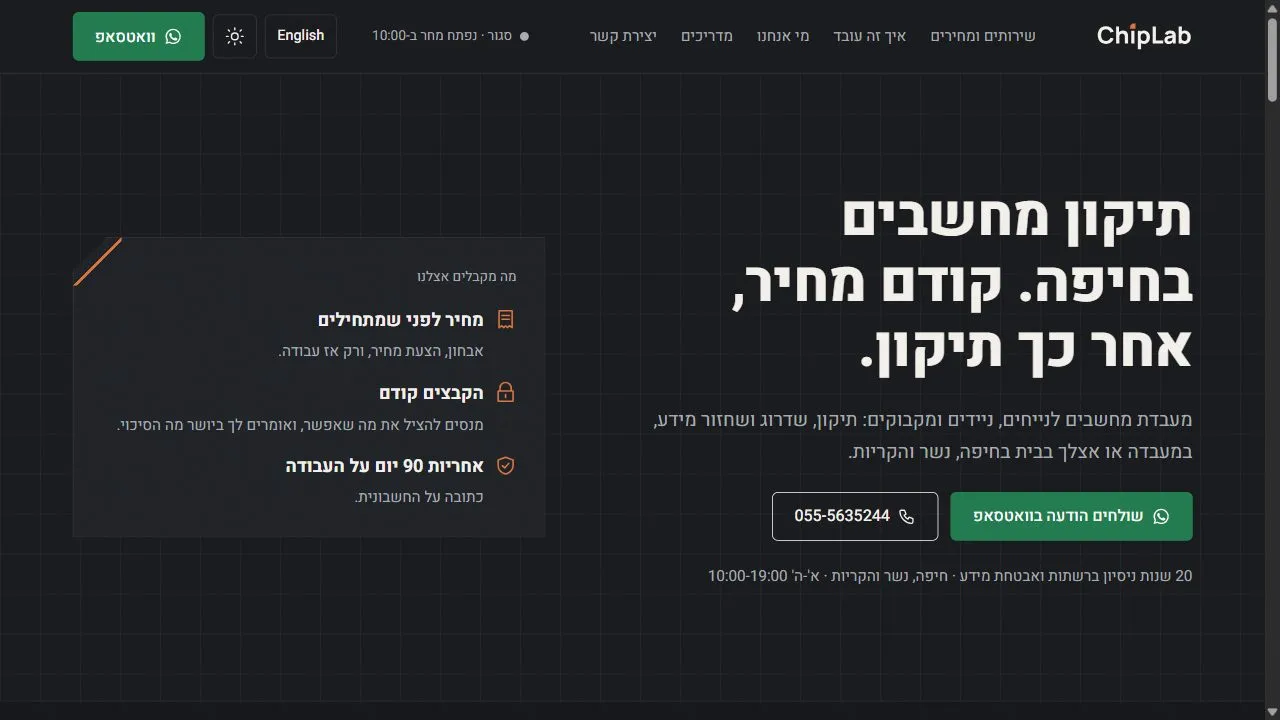
So the main headline of the site is the promise itself: “Computer repair in Haifa. Price first, then the repair.” Next to it, three commitments appear on the very first screen: a price before any work starts, files first, and a 90-day warranty on the work.
A price list that does not hide
Each of the 13 services on the site has its own page and a “from” price: Windows installation, virus removal, SSD upgrades, desktop and laptop repair, MacBooks, data recovery, Wi-Fi, printers, data transfer, a technician visit at home and more.
A “from” price on its own can feel like bait. So wherever a price appears, on the service page, in the price list, on the home page and even in the rep’s answers, two fixed sentences come with it:
- This is what is usually charged, and in some cases it may be higher.
- The price is the technician’s labor, and parts are added.
Those two sentences are the difference between a price that brings an enquiry and a price that leads to an argument. We covered this at length in our post on what a business website costs, and the same principle holds for any service business: a customer who understands what the price is made of trusts you more.
21 guides, and a rep that reads them
The goal of the site is written into it explicitly, for people and for AI engines alike: help people run and fix their computer themselves, and if they cannot, we will do it.
So it has 21 guides: a slow computer, a blue screen, a computer that will not turn on, Windows that will not boot, fake “tech support” scams, a laptop that will not charge, Wi-Fi in the safe room, backing up before the drive dies, and more. Every guide follows the same structure:
- A short answer right under the heading, for anyone who only wants the bottom line
- A decision table that helps figure out what the problem probably is
- What not to do, because sometimes an attempted fix makes the damage worse
- When to bring it to the lab, without scaring and without pushing
The guides are written with Israeli context, such as the local internet providers, a reinforced safe room that blocks Wi-Fi, and consumer protection law, so they answer questions that a guide translated from English does not. We wrote about why that works on Google and in AI engines in our post on the content types AI engines cite.
And the site has an AI rep that can open the guides by itself. Someone who asks it “my computer is slow, what do I do?” gets the steps from the guide, and if they did not help, the rep sends them to the lab’s WhatsApp. This is how the AI rep works on the sites we build.
The design: a lab at night
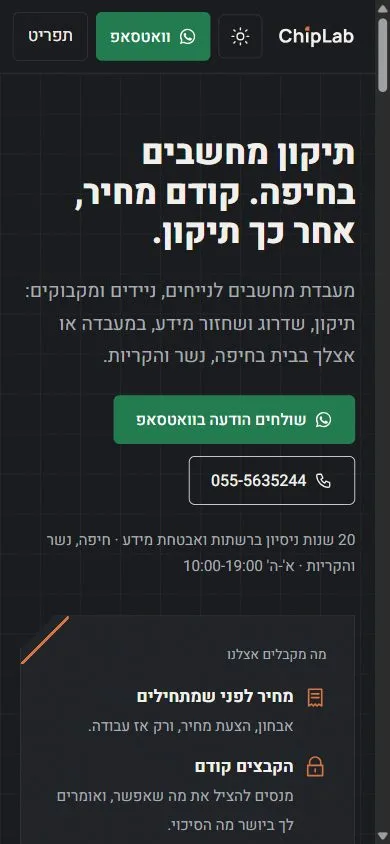
Two directions were presented: a bright lab and a lab at night. The dark one was chosen, with a switch that lets every visitor move to light, and the site remembers the choice. The copper that appears in the chip-shaped logo is used for small details only, such as the icons and the corner of the opening card.
To make the site feel like a lab rather than a template, a few effects were chosen: a main headline that scrambles for a moment like a device display, a “how it works” section that stays pinned while you scroll, a light that follows the mouse over the price list, and a slowly moving strip of computer brands. That strip has a pause button, because the accessibility standard requires a way to stop any continuous motion. More on text effects and how to use them without hurting readability.
A few more things you do not notice right away: the site also exists in English, it closes automatically on Shabbat and holidays by Haifa times, and the top of every page shows whether the lab is open right now.
The numbers
We measured the home page on October 20, 2026 with Google PageSpeed: three runs per device, and the median. Why a median and not a single test.
| Home page | Mobile | Desktop |
|---|---|---|
| Performance score | 100 | 100 |
| Largest Contentful Paint (LCP) | 1.38 s | 0.35 s |
| Total Blocking Time (TBT) | 16 ms | 0 |
| Cumulative Layout Shift (CLS) | 0 | 0.003 |
| Page weight | 89KB | 89KB |
| Requests | 6 | 6 |
Six requests and 89KB for a full home page, with effects, a theme switch and an AI rep. For comparison, the home page of the store we recently split requested 151 files before the split. The full story is here.
What your business can take from this
- Answer the first worry in the headline. If your customers worry about price, time or damage, give the answer on the first screen.
- A price with an explanation beats no price. “From” plus two honest sentences brings enquiries from people who already know what to expect.
- Free knowledge brings customers. A guide that helps people fix things themselves does not “steal” work. It shows you know your stuff, and anyone who could not manage alone knows who to call.
Summary
ChipLab got a site built from scratch in a week: 13 services with a “from” price, 21 do-it-yourself guides, an AI rep that reads them, dark and light modes, two languages, and a 100 performance score on mobile and desktop. Every decision on the site comes from the same promise: price first, then the repair.
Want a site like this for your business? Tell us what your business does, and we will come back with a direction and a quote.